

Goyral - JD EXTRACTOR | JustDial Data Extractor | Just Dial Extractor

Goyral

Justdial Data Extractor

Made for Justdial Listing Leads - JD-EXTRACTOR

Just Dial Extractor, Jd extractor,Just dial Data Extractor, Justdial data scraper

JustDail Extractor

Goyral JD Extractor

New Software Price : ₹999 INR
What's New in Justdail Lead Extractor.
  • ✅ SINGLE CLICK INTALLATION.
  • ✅ START SCRAPING UNLIMITED DATA.
  • ✅ USER FRIENDLY INTERFACE.
  • ✅ EXPORT DATA TO EXCEL.
  • ✅ No need For any Login or API
  • ⦾ 1 Year Software Licence Validity with Free Update and Support.
  • ⦾ 1 Licence Key Work only One Time Activation on Single Windows PC.
  • Resale Goyral Justdial Extractor with Your Brand Name

  • How to Install Goyral JD Extractor

    1 Download Goyral JD Extractor

    Click the Download ZIP file button and save the installation package on your computer. Keep the ZIP file - you need it in the next steps.

    chrome://extensions
    ExtensionsDeveloper mode
    Load unpackedPack extensionUpdate
    Goyral JD Extractor icon Goyral JD ExtractorExtension · Enabled

    2 Enable developer mode

    1. Open the Chrome Extensions page by either:
      • Type chrome://extensions in the address bar, then press Enter.
      • Or click the menu in the top-right, select "Extensions", then "Manage Extensions".
    2. Enable "Developer mode" at the top right of the Extensions page.

    3 Install Extension (Method 1)

    Load Unpacked Extension
    1. Extract the ZIP file to a new folder on your computer.
    2. Make sure you are on the Chrome Extensions page (chrome://extensions or menu → Extensions → Manage Extensions) with Developer Mode enabled.
    3. Click the "Load unpacked" button in the top-left corner.
    4. Select the folder where you extracted the files - the extension is installed immediately.

    Tip: Create a new folder (e.g. "Goyral JD Extractor") and extract the ZIP there so all extension files stay together. Do not delete that folder after installing - Chrome loads the extension from it.

    chrome://extensions
    ExtensionsDeveloper mode
    Load unpackedPack extensionUpdate
    Goyral JD Extractor icon Goyral JD ExtractorLoaded · Unpacked

    Alternative Installation Method (If Method 1 doesn't work)

    Method 2: Install By Drag & Drop

    Simply drag the ZIP file onto the chrome://extensions page to import it directly. Chrome unpacks it and asks for confirmation - click Add extension and Goyral JD Extractor is ready.

    🧩 Goyral JD Extractor icon Drop to install
    Phone No. Scrape

    Our Software Extract Mobile No. and Whatsapp Number Both.

    Any Business Category

    You can find data any category. Like Bulk SMS,School, Shop,Hospital etc.

    Extract All Details

    You can Find All data like Number, Address and more.

    Extract Data via Place

    You cand find business data via Place name near you.

    Unlimited Use

    You can Unlimited use in one year Under T&C.

    Rebrand for Rseller

    You can Resale this Software at your Price.
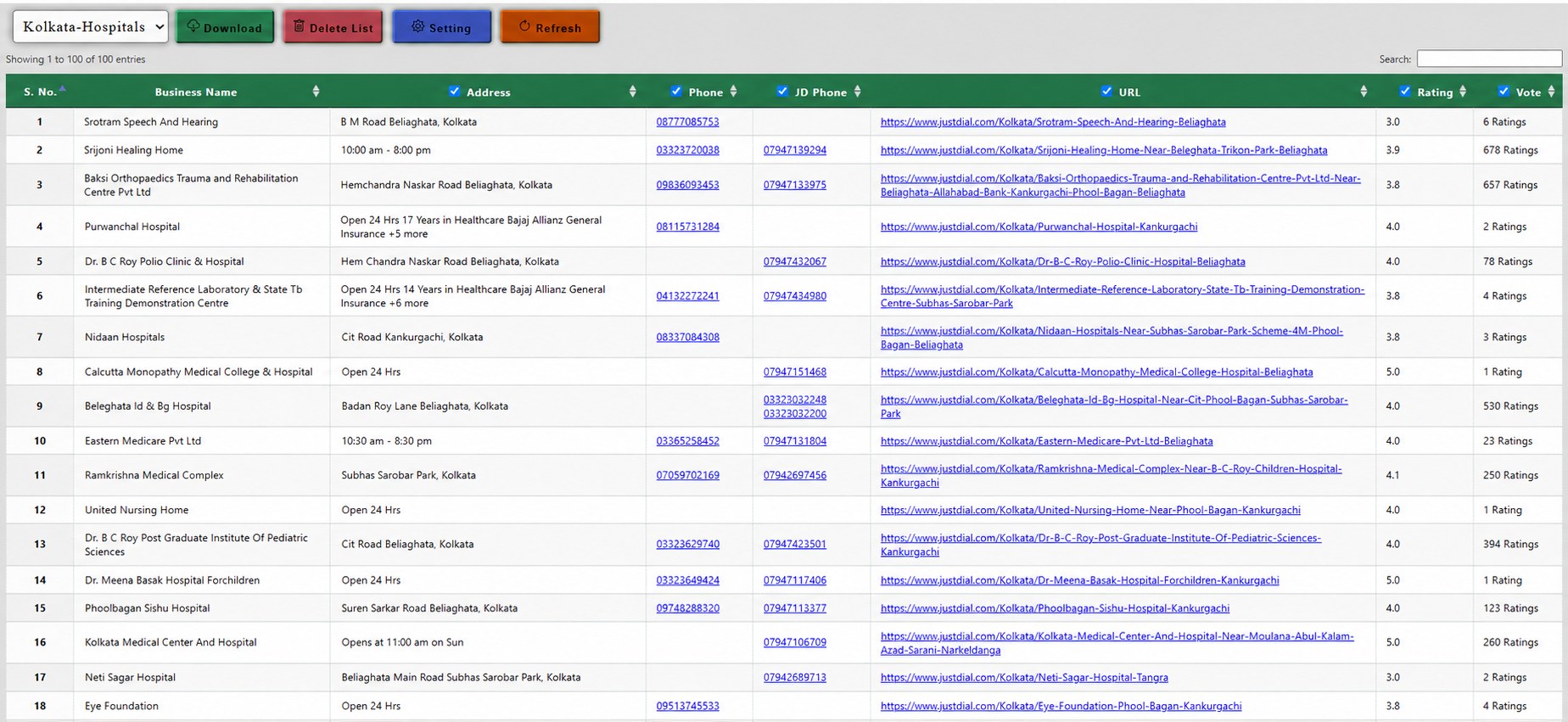
    Goyral JD Extractor - collected hospital data table with business name, address, phone, JD phone, URL and ratings, ready to download as Excel or CSV

    ↪ Requirement:
    ↪ Plan Features, T&C and Price Can be change any time without any notification.
    ↪ This Licence Key/Activate Key Work Only One Time on Single PC use only. If you Format Your Pc or Remove Software Then Reactivate Charge Extra Rs.300 – 6$ Apply.
    ↪ We not take any guarantee of accuracy of data. Because this software work from API.
    ↪ This is a third party software and not endorsed or certified by JustDial.
    ↪ We are not having guarantee of software working at Long time, because JustDial can be Change any type new privacy. (But we provide working Software Update if Available.)
    ↪ We not responsible for any illegal Activates. Please carefully know all T & Condition before use.
    ↪ After activation Licence Key of Software, Then No any Refund apply in any case.

    ↪ You can Sale This product at your Price. But Provide right info to your customers and Share Product Related all T&C.
    ↪ Your Activation time only for one month, Need to activate all key within one Month. Otherwise you loss your Key.
    ↪ Send Software Download Link to your customer, After install send me Software Machine Id For Activate.
    ↪ We Provide RPM Brand Installer exe Setup File. If you want Your Brand Installer then you need to pay Extra Rs.500/8 USD. (You can Get to Your Installer with Your Logo, Your Software Name and Your Website Link. No any change in Main Software.)
    ↪ We only provide support and updates for our direct customer. You will provide updates and support to your customers yourself.
    ↪ No Any Refund Allowed In any Case, Please carefully know all features and Terms before Purchase. We not Responsible for any activities.
    ↪ All Others Terms & Condition Apply, Please care fully read this.

    Related Software

    Need More Service?

    We Provide all Services, if You need more services then call me or contact with us.
    Get in Touch

    9519966354
    Chat me on Whatsapp