

Goyral

Goyral Super Extractor

Chrome Extension - Free to Download. Map Leads to Spreadsheet.

Read the Google Maps result list and export every place - phone, website and email - to CSV, XLSX or JSON.

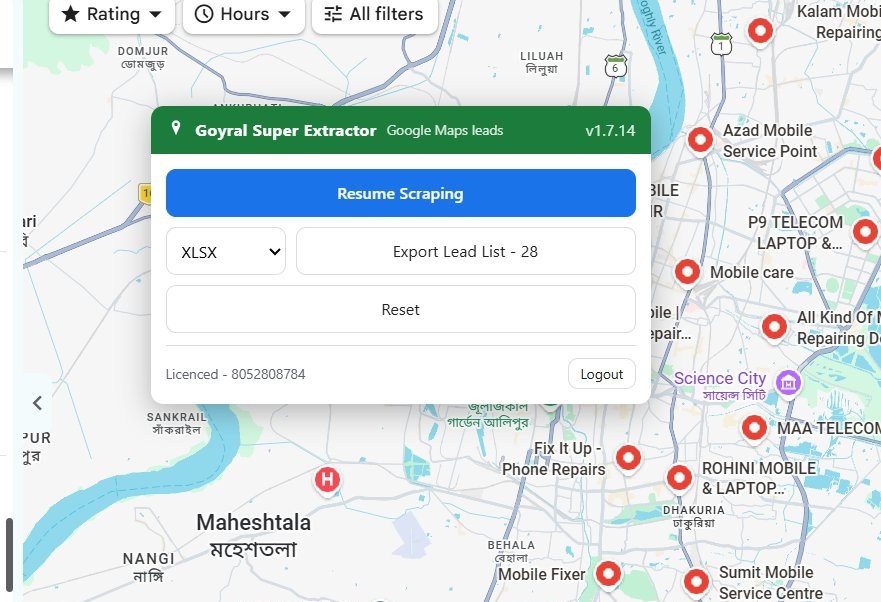
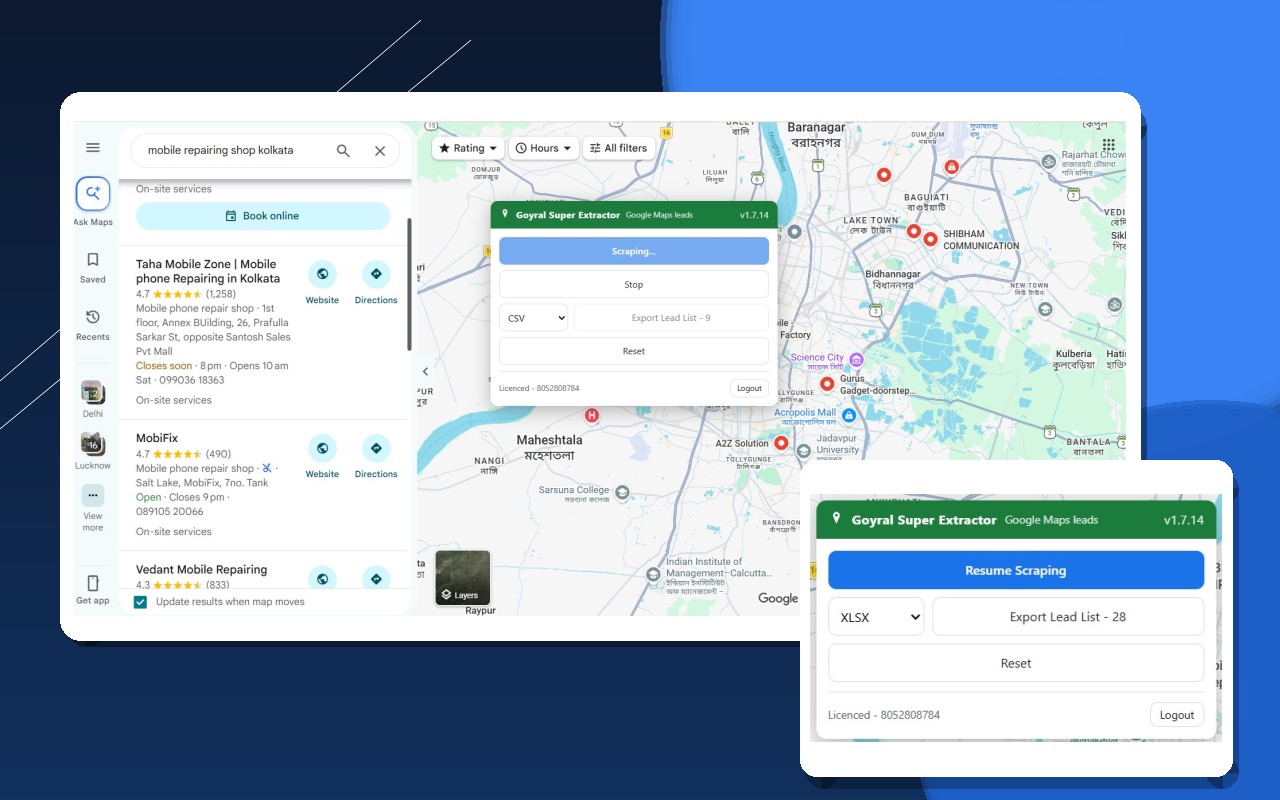
Goyral Super Extractor reading a Google Maps result list and exporting 28 collected leads to XLSX

Goyral Super Extractor

Download : Free ZIP package - install it in Chrome in about a minute. See the install guide on this page.

What You Get:
  • ✅ Reads the Google Maps result list and exports exactly those places.
  • ✅ Phone, website, email, address, rating, opening hours and image.
  • ✅ Mailbox and social links read from each place's own website.
  • ✅ Export the collected rows to CSV, XLSX or JSON.
  • ⦾ Current version 1.7.14 - updates install themselves.
  • ⦾ Runs inside Chrome on Windows, Mac and Linux. Nothing to install on your PC.
  • ⦾ The download is a ZIP package - install it with Developer mode, as shown below.
  • ⦾ No payment information is required to download or install & Try it.
  • Ask a question on WhatsApp

  • How to Install Goyral Super Extractor

    1 Download Goyral Super Extractor

    Click the Download ZIP file button and save the installation package on your computer. Keep the ZIP file - you need it in the next steps.
    chrome://extensions
    ExtensionsDeveloper mode
    Load unpackedPack extensionUpdate
    Goyral Super Extractor icon Goyral Super ExtractorExtension · Enabled

    2 Enable developer mode

    1. Open the Chrome Extensions page by either:
      • Type chrome://extensions in the address bar, then press Enter.
      • Or click the menu in the top-right, select "Extensions", then "Manage Extensions".
    2. Enable "Developer mode" at the top right of the Extensions page.

    3 Install Extension (Method 1)

    Load Unpacked Extension
    1. Extract the ZIP file to a new folder on your computer.
    2. Make sure you are on the Chrome Extensions page (chrome://extensions or menu → Extensions → Manage Extensions) with Developer Mode enabled.
    3. Click the "Load unpacked" button in the top-left corner.
    4. Select the folder where you extracted the files - the extension is installed immediately.

    Tip: Create a new folder (e.g. "Goyral Super Extractor") and extract the ZIP there so all extension files stay together. Do not delete that folder after installing - Chrome loads the extension from it.

    chrome://extensions
    ExtensionsDeveloper mode
    Load unpackedPack extensionUpdate
    Goyral Super Extractor icon Goyral Super ExtractorLoaded · Unpacked

    Alternative Installation Method (If Method 1 doesn't work)

    Method 2: Install By Drag & Drop

    Simply drag the ZIP file onto the chrome://extensions page to import it directly. Chrome unpacks it and asks for confirmation - click Add extension and Goyral Super Extractor is ready.

    🧩 Goyral Super Extractor icon Drop to install
    Reads The Result List

    Open a Google Maps search and the extension reads the places in the left result list.

    Full Business Details

    Phone, website, email, address, rating, opening hours and the place image.

    Email And Social Links

    The mailbox and social links are read off each place's own website when they are there.

    CSV, XLSX And JSON

    Download the collected rows as a spreadsheet, or as JSON for your own tools.

    Nothing On Your PC

    It runs inside Chrome on Windows, Mac and Linux - no desktop program to install.

    No Proxy Or API Key

    No proxy and no Google API key. The data comes from the page you yourself open.
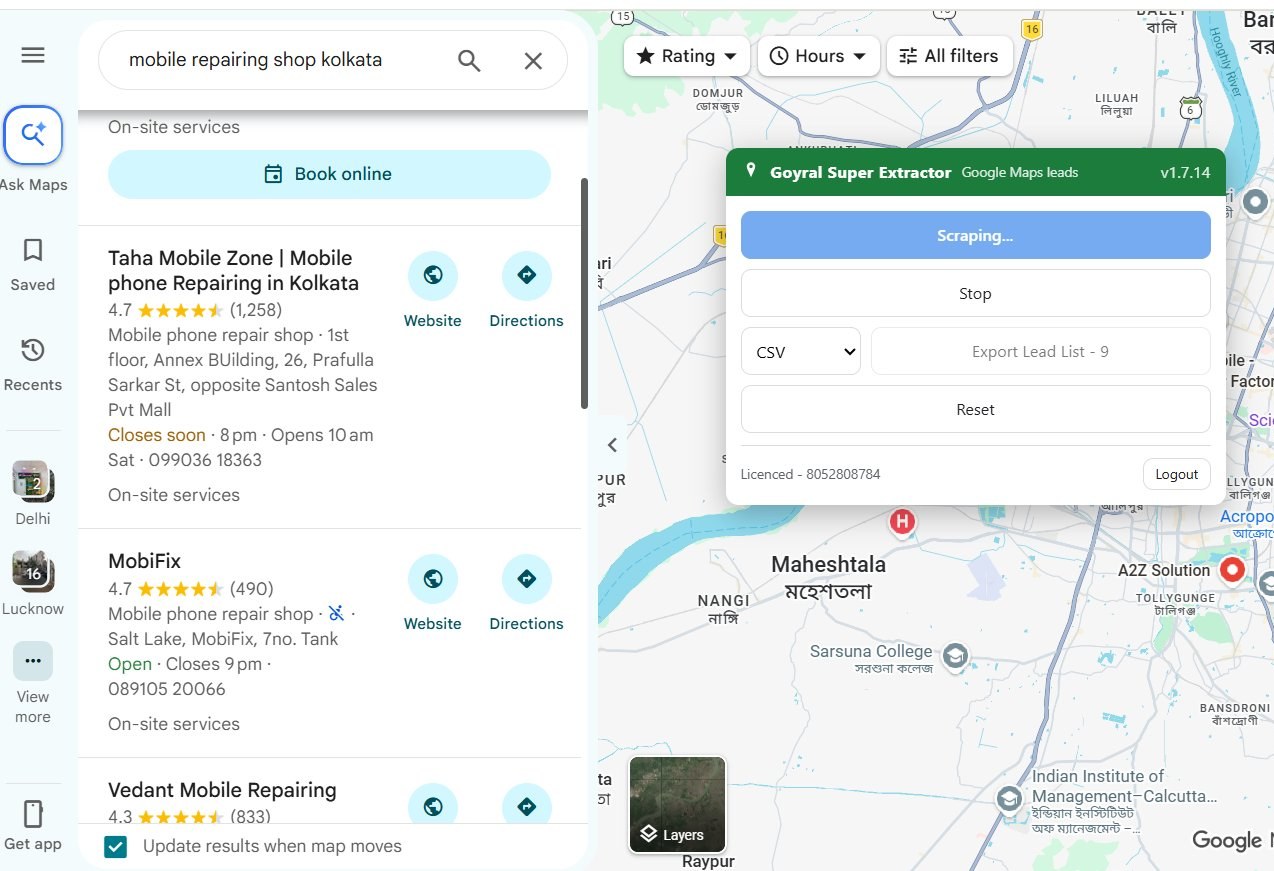
    Goyral Super Extractor scraping mobile repair shops from a Google Maps search, with the Export Lead List set to CSV
    Goyral Super Extractor popup resuming the scrape and exporting 28 collected rows to XLSX
    The exported Excel sheet holding every collected Google Maps lead - name, phone, website, email, address, rating and opening hours columns

    The Excel export itself - scroll sideways to read every row and column.

    1. Install

    Download the ZIP package with the Download ZIP file button in the How to Install section on this page and load it in Chrome.

    2. Search On Maps

    Open Google Maps and search the business type and place you want leads for.

    3. Collect

    Press start and the extension reads the places shown in the result list of that search.

    4. Export

    Save the collected rows as CSV, XLSX or JSON and use them in your campaign.


    Frequently asked questions
    ➞ Is Goyral Super Extractor free? Downloading and installing the extension is free - no payment information is asked for at download time.
    ➞ How do I download it? Press the "Download ZIP file" button in the How to Install section on this page. The ZIP package is saved on your computer, then you load it in Chrome with the three steps shown in that section.
    ➞ Do I need an account to download? No. Downloading and installing need no account and no email address.
    ➞ Which browser does it need? Google Chrome, or any Chromium based browser that lets you load an unpacked extension. It runs on Windows, Mac and Linux.
    ➞ Where is my data stored? The rows you collect stay in your browser until you export them. Spreadsheets are written to your own computer.
    ➞ Do I need a proxy or a Google API key? No. Goyral Super Extractor works directly in your browser without any API key.

    Terms & Conditions
    ➞ Important: Goyral Super Extractor reads data from pages you yourself open in your browser. Please respect the terms of use of the websites you visit.
    ➞ We do not take any guarantee of the accuracy of the data collected.
    ➞ This is a third party software and is not endorsed or certified by Google.
    ➞ Google changes its pages from time to time; we publish updates whenever a change breaks collection.
    ➞ We are not responsible for any illegal activity carried out with the collected data. Please read these terms carefully before use.
    ➞ Features and terms can change at any time without prior notification.

    Related Software

    Need More Service?

    We Provide all Services, if You need more services then call me or contact with us.
    Get in Touch

    9519966354
    Chat me on Whatsapp